AI Video Analytics

Any space. Every camera.
One AI watching for what matters.

NewVis turns the CCTV cameras you already own into a real-time safety brain — spotting a fall, an intruder, a fight or someone in a restricted zone the moment it happens, and putting the evidence one click away. On affordable hardware. No rip-and-replace.

Works with existing RTSP cameras Runs on-site — video stays private Built for 300-camera campuses
NewVis — Live Analytics · Camera 07 LIVE
Live alert stream49 today
Restricted-zone entry · Gate B
Loitering · 24s in Corridor 3
Snapshot saved · clip ready
~24%Lower 3-year cost of ownership (modelled)
~97%Person-recall on low-bandwidth streams*
300→6Cameras run on ~6 affordable boxes
24/7Every camera, always watched
The problem

Hundreds of cameras. Nobody who can watch them all.

Most incidents are discovered after they happen, by scrubbing hours of footage. And putting live AI on every feed usually means a room full of GPU servers costing crores. NewVis changes both.

Without NewVis

  • A wall of screens no single guard can truly monitor.
  • Falls, fights and intrusions found hours later — or never.
  • Hunting through footage manually for one event.
  • "AI upgrades" that mean ripping out cameras and buying servers.

With NewVis

  • Every feed understood in real time — nothing goes unwatched.
  • Staff get a plain-English alert the instant something happens.
  • Every alert carries a snapshot and a one-click jump to the exact clip.
  • Uses the cameras you already have, on affordable on-site hardware.

Sees every feed

Detects and tracks people across all your cameras at once — counting, following, understanding.

Alerts instantly

The moment a rule is broken — intrusion, loitering, after-hours — the right person is notified.

Evidence in one click

Each alert saves a snapshot and links straight to the exact moment in the recorded footage.

Follows across cameras

Recognises the same person from camera to camera as a single anonymous ID — no faces, no names.

Product tour

See what NewVis actually does.

Six modules, shown as they really are: screenshots of the NewVis dashboard and frames from the NewVis analytics pipeline. Nothing on this page is a mock-up.
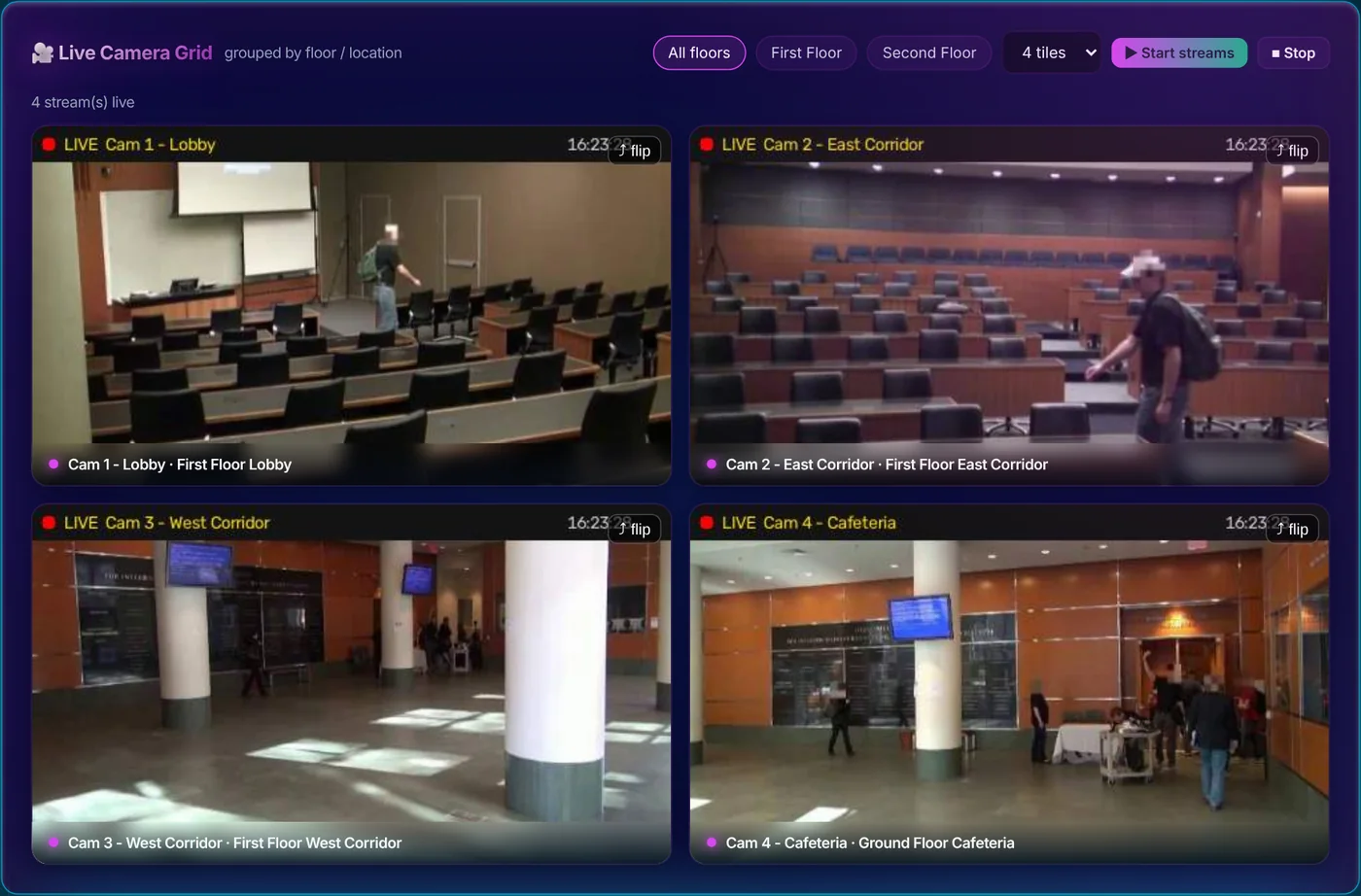
NewVis · Live Cameras
NewVis Live Cameras screen showing four camera feeds in a grid, grouped by floor
ProductionReal dashboard

Every camera, on one screen.

Connect existing CCTV over standard RTSP and watch every feed live in one grid, filtered by floor, with the camera name and time on every tile.

  • Works with the IP cameras and NVRs you already have
  • Group and filter cameras by floor or location
  • Analyses a light sub-stream while the full-resolution stream keeps recording
  • Each role only sees the cameras and pages it is allowed to
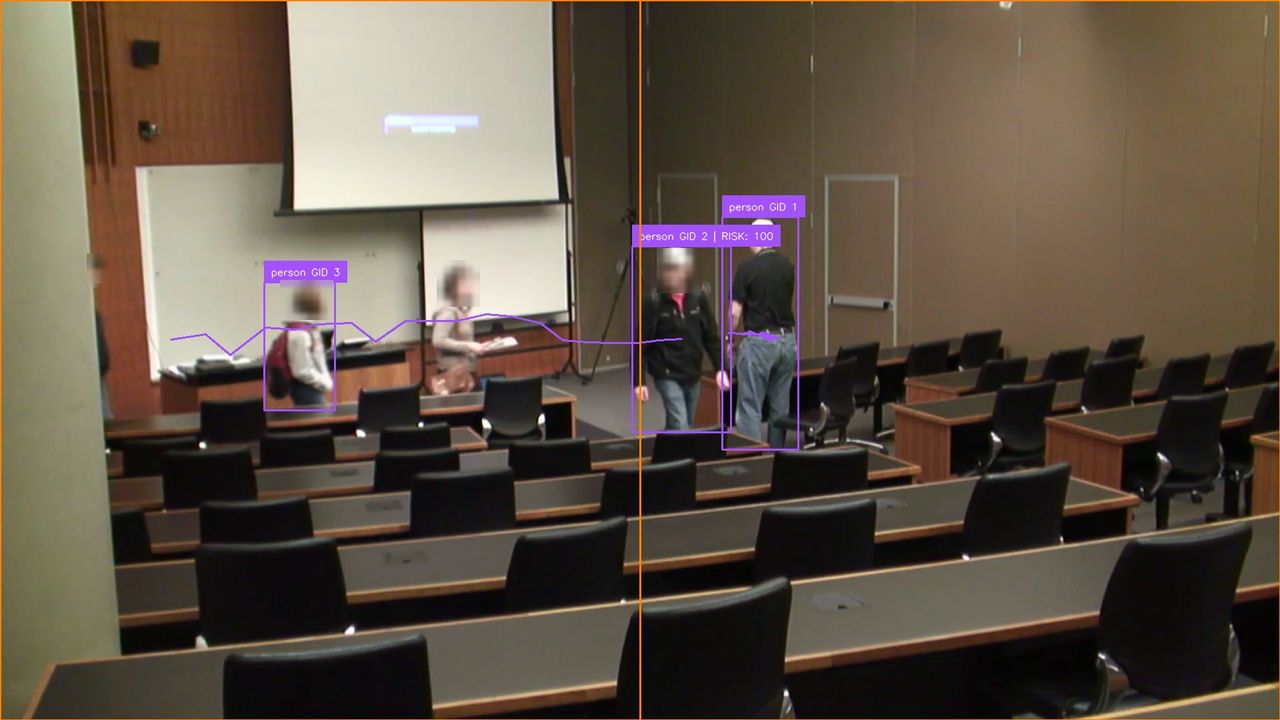
NewVis · Live Video Analytics
NewVis tracking several people in a lecture hall, each with an anonymous ID and a movement trail
ProductionReal output

Every person found, followed and counted.

NewVis detects each person in frame, gives them an anonymous ID and draws the path they take, so you see movement, not just snapshots.

  • Person detection and multi-person tracking in real time
  • Movement trails and live headcount per camera and per zone
  • The same person recognised across cameras as one ID Beta
  • Anonymous by design: IDs, not names, and no face recognition
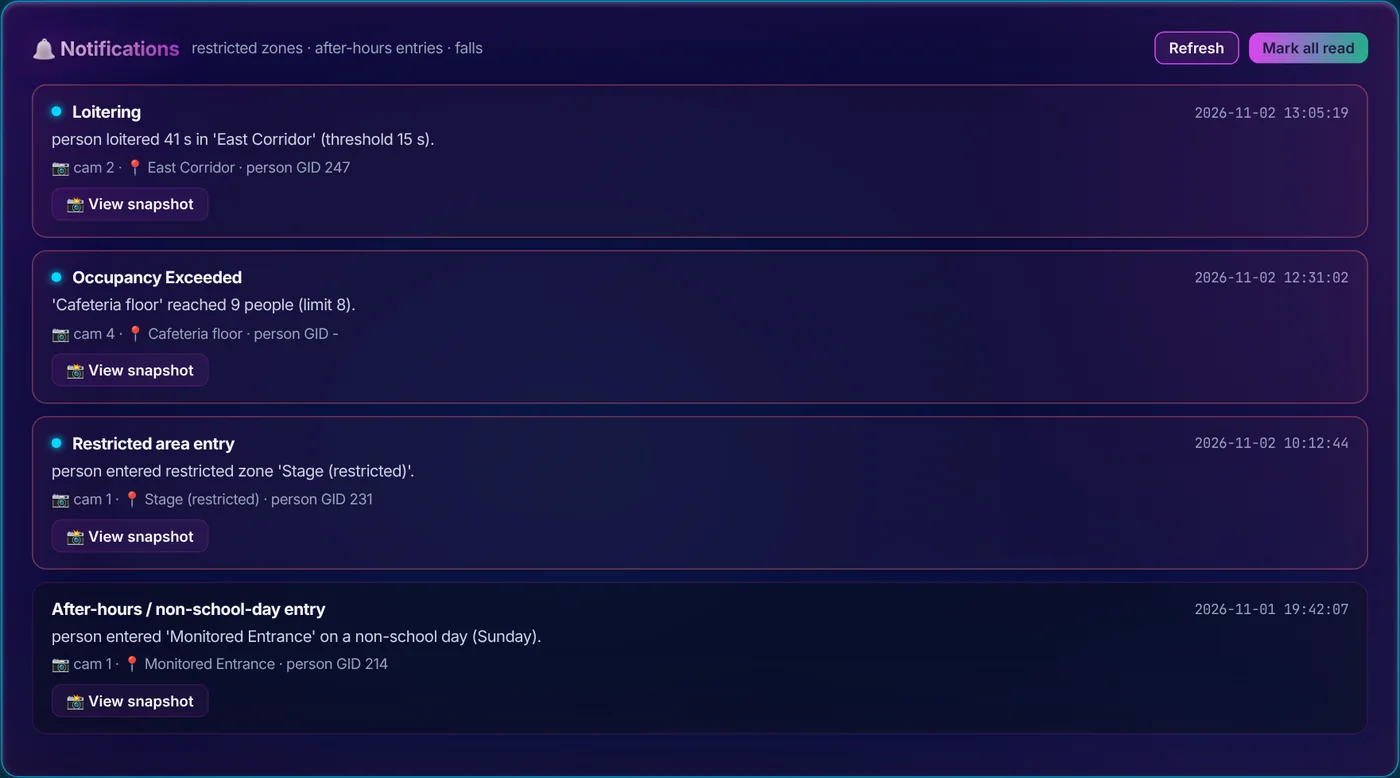
NewVis · Notifications
NewVis notifications inbox listing loitering, occupancy, restricted-area and after-hours alerts with camera, zone and time
ProductionReal dashboard

An alert with the evidence attached.

When a rule is broken, the right person gets a notification saying what happened, where and when, plus a snapshot of that exact frame with the person boxed. Switch between the inbox and a snapshot below the screen.

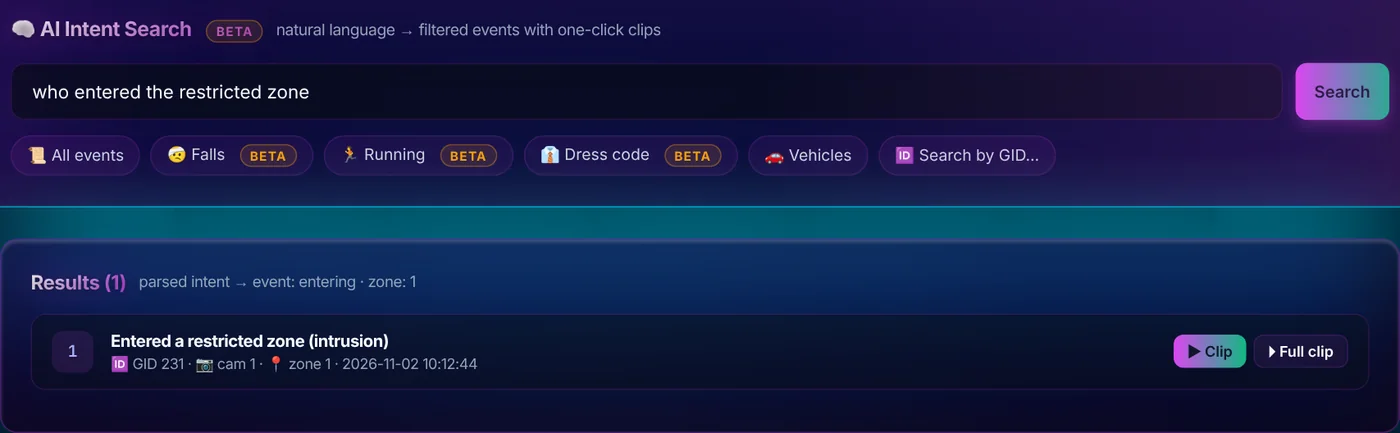
  • Restricted-zone, after-hours, loitering and occupancy alerts
  • Snapshot evidence saved with every alert
  • Jump to the recorded clip of the moment
  • Fall, running and altercation alerts Beta
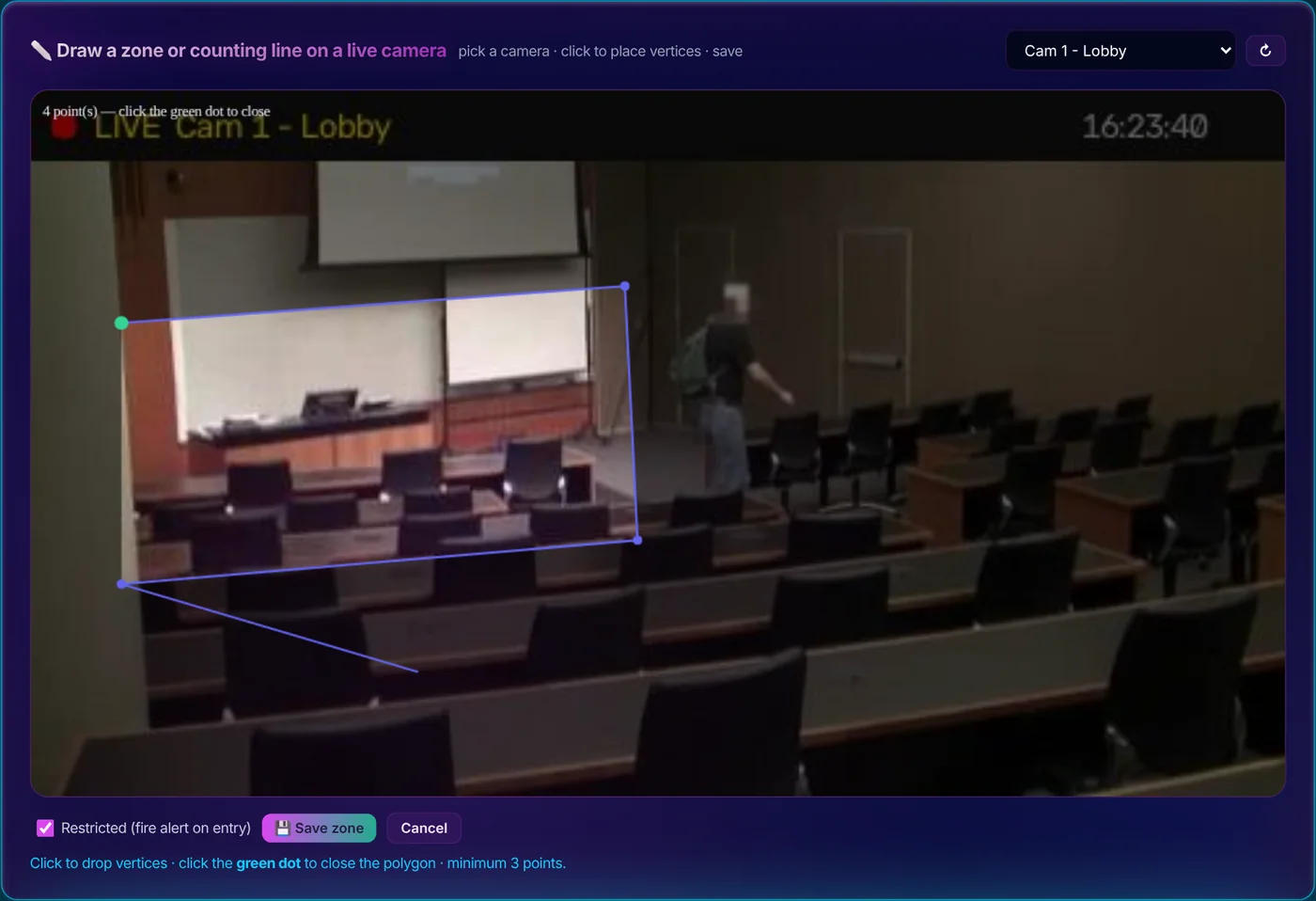
NewVis · Zones & Rules
Drawing a restricted zone polygon directly on a live camera view in the NewVis zone editor
ProductionReal dashboard

Draw the rules once. NewVis enforces them 24/7.

Click out a restricted area or a counting line directly on the live camera view, then set when each rule applies: hours, school days and a holiday calendar.

  • Draw polygon zones and in/out counting lines on any camera
  • Per-zone active hours and school days
  • Holiday calendar, so a non-school day is treated as one
  • Every entry and exit logged for reports
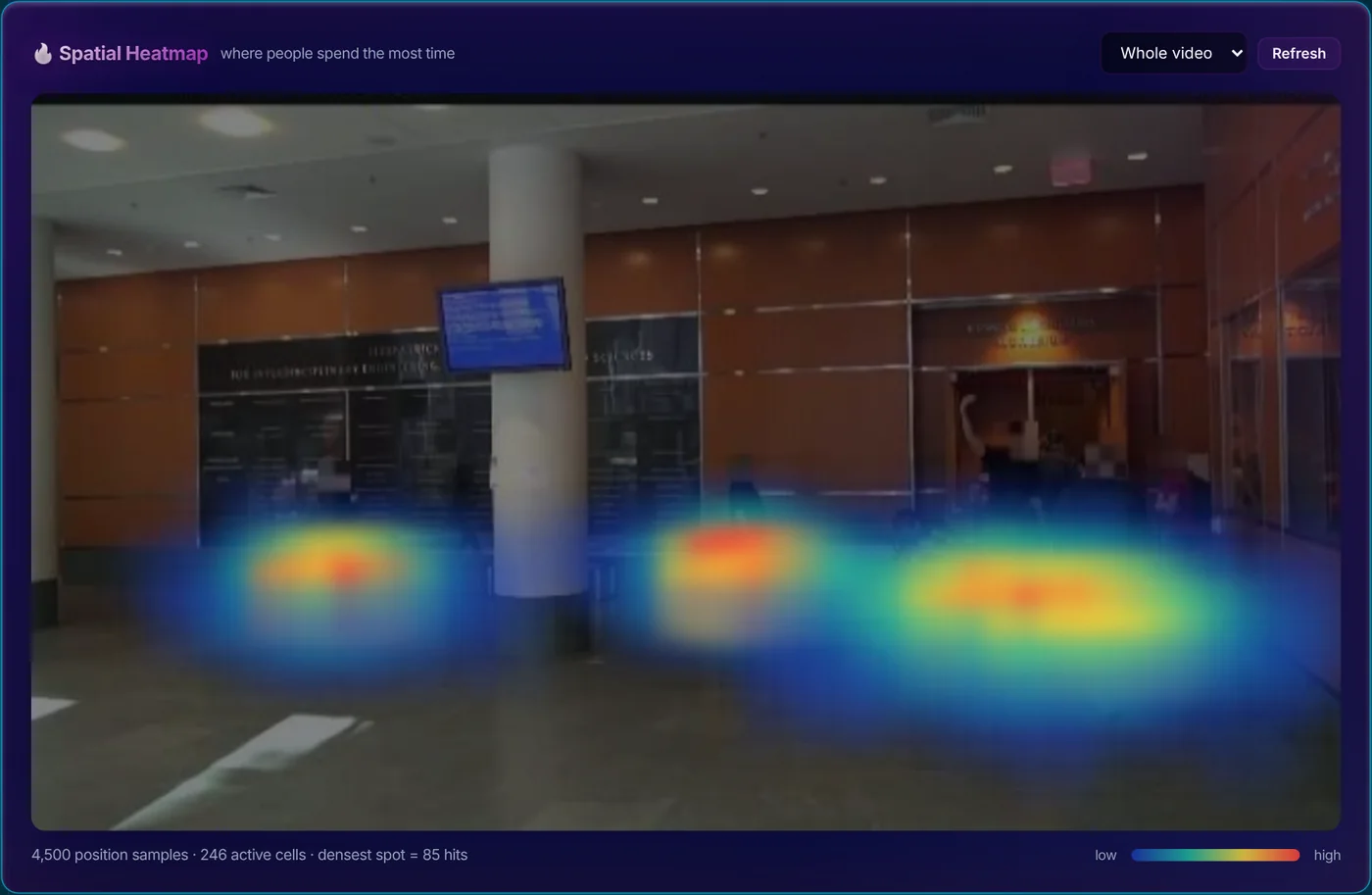
NewVis · Reports & Heatmap
NewVis spatial heatmap over a cafeteria camera view, showing where people spend the most time
ProductionReal dashboard

Know how your space is actually used.

The cameras that watch for incidents also count. Headcount by hour, entries per zone and dwell heatmaps show which areas are busy, when, and where people linger.

  • Headcount by hour and entries per zone
  • Spatial heatmaps of where people spend time
  • Scheduled periodic reports and data export
  • Append-only audit log of who viewed or changed what

Screenshots show the NewVis dashboard running on test footage with a sample day of activity. Alert snapshots, heatmaps and charts are produced by NewVis itself. Faces are blurred for this website; in the product, people are tracked as anonymous IDs, not identified.

One console, three views

Everyone sees what they need. Nothing more.

Leadership

Principal / site head

Answers, not footage.

  • Alert inbox with evidence
  • Reports, headcount and heatmaps
  • Plain-English search (Beta)
  • Audit log of who did what
Operations

Security & tech team

Runs the cameras and the rules.

  • Live grid and live analytics
  • Draw zones, lines and schedules
  • Upload and analyse recorded footage
  • Investigate incidents across cameras (Beta)
Administration

System administrator

Controls access and licensing.

  • User and role management
  • Per-feature licensing
  • Holiday calendar and system settings
  • Full audit trail
Built for any space

One platform. Every kind of site.

NewVis is space-agnostic — anywhere you have cameras, it adds a layer of understanding. It's currently proven in the most demanding environment there is: a live school campus.

Schools & campuses Flagship

The launch deployment — a ~300-camera school. NewVis watches corridors, gates and grounds for the incidents that matter to a school, day and night.

  • Restricted-zone & after-hours intrusion alerts (with a holiday calendar)
  • Fall & loitering awareness in corridors and stairwells (Beta)
  • Headcount, footfall and busiest-hour reports per area
  • One-click evidence for any incident review

Malls & retail

Turn cameras into footfall analytics and after-hours security in one.

  • Footfall counts & heatmaps by zone
  • Loitering & crowd awareness
  • After-hours intrusion alerts

Parking lots

Keep an eye on quiet lots and controlled entries around the clock.

  • Line-crossing in/out counts
  • Restricted / after-hours entry alerts
  • Snapshot + clip on every event

Offices & corporate

Enforce access policy on sensitive areas without staring at screens.

  • Restricted-zone access alerts
  • After-hours presence detection
  • Role-based access & audit trail

Warehouses & industrial

Safety zones and headcount across large, sparsely-staffed floors.

  • Keep-out safety-zone alerts
  • Headcount & occupancy by area
  • Fall awareness in low-traffic zones (Beta)

Somewhere else?

Hospitals, transit hubs, gated communities — if it has cameras, NewVis fits. Tell us your site and we'll map it out.

Discuss your site
Capabilities

Everything NewVis can do — labelled honestly.

We split features into Production (deterministic, dependable) and Beta (live, but accuracy still being measured on real footage). We'd rather tell you the truth than oversell.

Detection & tracking

Person detection & live trackingProduction
Multi-camera live grid (RTSP)Production
Fall detectionBeta
Running / sudden-motion detectionBeta
Fight / aggression awarenessBeta

Zones & alerts

Draw zones + entry/exit loggingProduction
Restricted-zone / intrusion alertsProduction
After-hours + holiday-calendar alertsProduction
Dwell-time / loitering detectionProduction
Line-crossing in/out countsProduction

Evidence & reports

Notification inbox + snapshot evidenceProduction
One-click jump-to-footage clipsProduction
Dwell / spatial heatmapsProduction
Headcount charts + periodic reportsProduction
Plain-English AI activity summaryBeta

Cross-camera & intelligence

Role-based access + audit logProduction
Cryptographic per-feature licensingProduction
Cross-camera Re-ID (Global ID)Beta
Natural-language search of eventsBeta
Investigation graph & risk scoringBeta
Production Deterministic & dependable today. Beta Live, advisory, accuracy being validated on real footage.
How it works

Live in three steps — no new cameras.

STEP 01

Connect your cameras

NewVis plugs into your existing RTSP CCTV feeds. Nothing gets ripped out; video stays on your own site.

STEP 02

NewVis understands them

On-site AI watches every feed — detecting people, tracking movement, applying your zones and rules 24/7.

STEP 03

Staff get plain-English alerts

The right person is notified the instant something matters — with a snapshot and a one-click jump to the clip.

Why NewVis

Where NewVis is different.

Uses cameras you already own

Works with your existing CCTV over standard RTSP. No forklift upgrade, no vendor lock-in on hardware.

Affordable & edge-first

Runs on modest on-site boxes — even CPU or USB AI accelerators — with no per-camera cloud fees. Raw video never leaves the building.

True cross-camera identity

Follows one person across cameras and floors as a single ID — and respects a real camera map, so no impossible "teleport" matches.

Privacy-first by design

People are tracked as anonymised IDs — no faces, no names — behind role-based access, licensing and an append-only audit log.

Plain-English, not raw logs

Ask "show falls on camera 3" and read a written summary of activity — built for staff, not data engineers.

Cost-optimised, accuracy-preserving

A stack of efficiency levers cuts compute without trading away detection — we don't ship anything that regresses accuracy.

The numbers

More safety. Less cost. No extra staff.

Cost figures below are engineering estimates modelled for the flagship 300-camera school deployment; accuracy figures are measured in our own GPU benchmarks. Your numbers depend on your site — that's exactly what a callback is for.

~24%

lower 3-year total cost of ownership (engineering estimate) — from an accuracy-neutral efficiency stack (sub-stream analytics, hardware decode, motion gating, batching).

Compute boxes for 300 cameras9 → 6
Analytics bandwidth−65%
Power draw~−45–50%
Compute on idle cameras~−36%
~97%Person-detection recall retained on low-bandwidth sub-streams*
0.999999Cosine parity of the optimised recognition model — no accuracy lost, ~46% smaller
~20–22%More cameras per GPU from deferred cross-camera matching

*Measured 96.97% at 720p in our GPU-laptop validation (passed the ≥95% safety gate). Beta features (fall, running, fight, dress-code, Re-ID) are advisory and not yet given published accuracy numbers.

See NewVis on your own cameras.

Tell us about your site and what you're trying to protect. We'll call you back and map exactly how NewVis would work for you — no obligation.

Request a callback